What is Bufferbloat and How Does It Ruin Online Gaming?
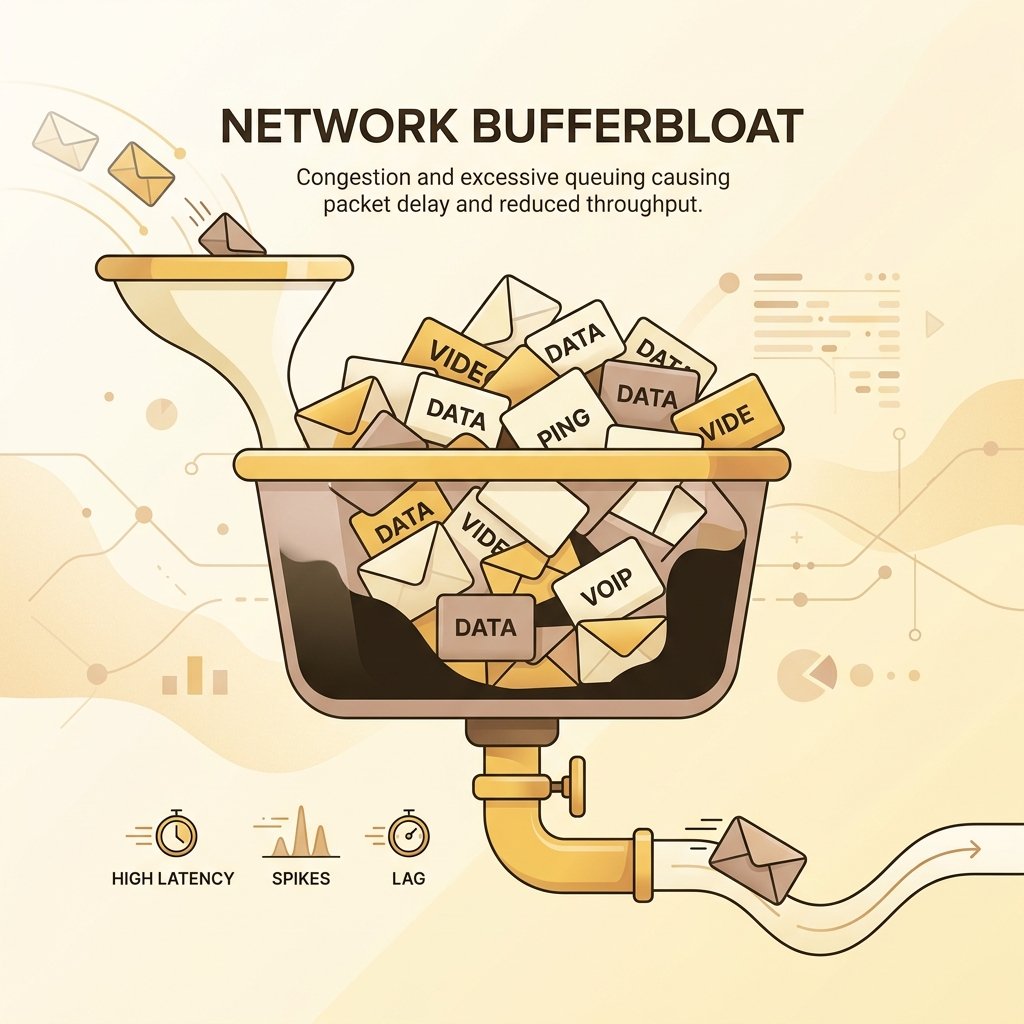
If you have ever been in the middle of a competitive online match and suddenly lagged out because someone in another room opened a YouTube video, uploaded a photo, or started a download, you have experienced Bufferbloat.
Bufferbloat is a silent connection killer. It is a software-induced latency spike that occurs when your router's network buffers get overloaded with data, delaying time-sensitive packets like gaming inputs or audio calls. You can have a high-speed gigabit plan and still experience unplayable gaming sessions if your network suffers from bufferbloat.
In this comprehensive guide, we will dive deep into what bufferbloat is, why standard speed tests fail to diagnose it, and the steps you can take to banish it from your home network forever.
---
The Bufferbloat Phenomenon: Why Fast Speeds Can Still Feel Laggy
Buffering is a concept that most internet users are familiar with. When streaming a video on Netflix or YouTube, the media player downloads a few seconds or minutes of the video ahead of time and stores it in memory. This buffer acts as a shock absorber; if the network speed drops momentarily, the player can continue playing the buffered video without interruption. In the context of downloading files or watching pre-recorded video streams, buffering is a positive feature that enhances the user experience.
However, routers and network devices also implement buffers, but for a different reason: packet loss prevention. In packet-switched networks, data is broken down into small units called packets. When packets arrive at a router faster than the router can transmit them out of an outgoing port (due to bandwidth limits or congestion), the router cannot transmit them immediately. To prevent these excess packets from being discarded (dropped), the router places them in a buffer, which is essentially a queue in the router's RAM. The packets wait in the buffer until the outgoing link becomes available.
While this buffering prevents packet loss, it introduces a major side effect: latency. A packet sitting in a queue is delayed. If the queue is very deep (meaning the buffer is large), the delay can be massive. When a network link is fully saturated, the buffer fills up completely. Any new packet arriving at the router must wait in line behind all the other packets already in the buffer. This waiting time is known as queueing delay.
This is where the discrepancy in Internet Service Provider (ISP) marketing becomes apparent. ISPs spend millions of dollars marketing "internet speed," which they measure in Megabits per second (Mbps) or Gigabits per second (Gbps). However, in networking, speed is a combination of two factors: throughput (bandwidth) and latency (responsiveness). Bandwidth is the capacity of the link—how much data can be sent per second. Latency is the travel time—how long it takes for a single packet to go from source to destination and back.
ISP marketing equates high bandwidth with high speed. But high bandwidth only means a wider pipe, not a faster travel time. If your connection is idle, a packet might travel to a gaming server in 15 milliseconds. But if another device on your network starts downloading a large file, saturating the connection, your router's buffers will fill up. Your gaming packets, which are tiny, will get stuck behind the massive file transfer packets in the buffer. Your latency will spike from 15ms to 200ms or 300ms.
This is bufferbloat: the bloating of buffers causing high latency on an otherwise fast connection. It is the reason why a 1 Gbps fiber line can feel laggy and unresponsive if the router's buffer management is poorly configured.
---
Why Router Buffers Squeeze Gaming Packets
To understand why bufferbloat is particularly destructive for online gaming, we must examine the transport protocols that govern the internet: TCP (Transmission Control Protocol) and UDP (User Datagram Protocol), and how they interact with network buffers.
Most bulk data transfers, such as downloading game updates, web browsing, and streaming video, utilize TCP. TCP is a reliable transport protocol, meaning it guarantees that all sent data is received intact and in the correct order. To achieve this, TCP uses a mechanism called windowing and congestion control. When a TCP connection is established, the sender begins transmitting packets. It monitors the acknowledgments (ACKs) sent back by the receiver. If ACKs return quickly and without loss, the sender increases its "congestion window" (cwnd), sending more packets simultaneously.
TCP will continue to increase its transmission rate, pushing more and more data onto the link, until it detects packet loss (a missing ACK). When packet loss occurs, TCP interprets this as a signal that the network link is saturated, backs off its transmission rate (usually cutting the window size in half), and then slowly starts increasing it again. This cycle is continuous.
In an ideal network, the router at the bottleneck link has a small buffer. As TCP increases its rate and exceeds the link's capacity, the small buffer fills quickly, and the router is forced to drop a packet. The TCP sender immediately detects this drop and slows down. The queue clears, and latency remains low.
However, router manufacturers want to avoid packet drops at all costs because dropped packets require TCP to retransmit the data, which can slightly reduce total throughput. To maximize throughput numbers (which look great on speed tests), manufacturers install cheap RAM and configure extremely deep, unmanaged buffers in their routers and modems. This is called "tail drop" queueing.
When a TCP bulk download runs on a router with deep buffers, the router does not drop packets when the link capacity is exceeded. Instead, it stores the excess packets in its deep buffer. Because no packets are dropped, the TCP sender does not receive the signal to slow down. It keeps increasing its transmission rate, stuffing more and more packets into the buffer. The buffer fills to the brim, holding hundreds of milliseconds of data.
While TCP throughput remains high, any other traffic on the network is severely affected. Online multiplayer games do not use TCP; they use UDP. UDP is an unreliable, connectionless protocol designed for speed and low latency. Games send small updates (like player movement coordinates, button presses, and shooting actions) as individual UDP packets, typically 30 to 100 times per second. Unlike TCP, games do not need reliability; if a coordinate packet is lost, it is useless to retransmit it because a newer coordinate is already available.
However, when these time-critical UDP gaming packets arrive at the router, they are placed in the same single queue (FIFO - First-In, First-Out) behind the thousands of buffered TCP packets from the bulk download. The UDP packets must wait for the entire buffer to empty before they can be transmitted. The game packet is delayed by 200ms or more. In a fast-paced game, a delay of 200ms is the difference between hitting a target or being eliminated. The game client experiences a sudden lag spike, characters rubber-band, and inputs feel unresponsive, all while the router is proudly maintaining a full download stream.
---
How to Perform a Bufferbloat Audit
Before you can fix bufferbloat, you must diagnose its severity on your local network. A standard idle ping test (like typing `ping google.com` in your terminal when no one is using the internet) will not reveal bufferbloat. Bufferbloat only occurs when the network link is under load. Therefore, you must perform a "loaded latency" audit.
Here is a step-by-step guide to conducting a manual bufferbloat audit using built-in system tools:
Step 1: Establish Your Baseline (Idle Latency)
First, ensure that all other devices on your home network are idle. Pause any active downloads, video streams, or cloud backups.
Open your computer's terminal (Terminal on macOS/Linux, Command Prompt or PowerShell on Windows).
Type the following command to ping a reliable, close public server (such as Google's DNS or Cloudflare's DNS) and press Enter:
This command sends 20 ICMP echo requests to the server. Note the average round-trip time (RTT) and the consistency of the times. For a healthy fiber connection, this might be 5–15ms; for cable, 15–30ms; for DSL, 20–40ms. The variance (jitter) should be minimal (under 2-3ms).
Step 2: Introduce Network Load
Now, you need to saturate your internet connection. You can do this in one of two ways:
Step 3: Run the Latency Test Under Load
While the heavy download or upload is running at full speed, go back to your terminal and run the same ping command again:
`ping -c 20 1.1.1.1` (or `ping -n 20 1.1.1.1` on Windows).
Observe the ping times.
Step 4: Evaluate the Results
Compare your idle ping with your active ping under load:
---
The Ultimate Cure: Smart Queue Management (SQM)
The traditional method routers use to handle packets is FIFO (First-In, First-Out). In a FIFO queue, the router processes packets in the exact order they arrive. If a massive file download floods the router with packets, they fill the queue, and every packet—including small gaming packets—must wait in line.
To solve this, network researchers developed Smart Queue Management (SQM). SQM replaces simple FIFO queues with intelligent scheduling and active queue management (AQM) algorithms. Instead of treating all packets equally, SQM analyzes network traffic dynamically and ensures that no single data stream can monopolize the connection.
The two most prominent and effective SQM algorithms used in modern routers are FQ_CoDel and Cake.
FQ_CoDel (Fair Queueing Controlled Delay)
FQ_CoDel is a hybrid algorithm that combines two concepts: Fair Queueing (FQ) and Controlled Delay (CoDel).
Cake (Common Applications Kept Enhanced)
Cake is the successor to FQ_CoDel and represents the state-of-the-art in Smart Queue Management. Developed by the same team, Cake simplifies configuration while introducing several advanced features:
By deploying SQM (FQ_CoDel or Cake), your router keeps network buffers thin. Game packets are routed instantly via sparse flow prioritization, while bulk downloads are kept in check. Your active ping under load remains virtually identical to your idle ping.
---
Manual Router Tuning: QoS and Bandwidth Capping
If your home router is a standard model supplied by your ISP, it may not support advanced SQM algorithms like FQ_CoDel or Cake. However, you can still drastically reduce bufferbloat through manual router tuning, specifically by configuring Quality of Service (QoS) and setting bandwidth caps.
Here is how to configure your router manually to eliminate bufferbloat:
1. Implement Bandwidth Capping (Traffic Shaping)
The primary cause of bufferbloat is moving the network bottleneck from a device you control (your router) to a device you do not control (the ISP's modem, DSLAM, or cable node). When your connection is fully saturated, the packets queue up in the ISP modem's deep, unmanaged buffers.
By setting a bandwidth limit (cap) on your router slightly below your physical plan speed, you force the bottleneck to occur on your router. Your router's CPU can then manage the queue, preventing the ISP modem's buffers from ever filling up.
2. Configure Device and Protocol Priorities
If your router uses legacy QoS (often labeled "Priority QoS" or "device-based QoS"), you can manually assign priority levels to traffic:
3. Transition to a Wired Ethernet Setup
No amount of router QoS can fix queueing delays occurring over the airwaves. WiFi is a half-duplex medium: only one device can transmit or receive on a channel at any given microsecond. Wireless networks rely on collision avoidance, meaning devices must wait for the channel to be clear before sending data.
---
Action Plan: Banish Bufferbloat from Your Network
To summarize the steps you should take to achieve a lag-free gaming experience under any network load: